The Startup's Pragmatic Guide to SOC 2 Compliance
What it is, why you need it, and how to get certified without wasting months of developer time or going broke.


In this article
- What is SOC 2 (And Why Does Everyone Ask for It)?
- Type I vs. Type II: What's the Difference?
- Who Actually Needs a SOC 2 Report?
- How to Start the Compliance Process
- What the Compliance Process Looks Like
- The Costs: Software vs. Auditor Fees
- How SOC 2 Compares to Other Standards
- Honest Caveats: When NOT to get SOC 2
You're closing in on what feels like a breakthrough deal with a mid-market buyer. The meetings went great, the demo was flawless, and the champion's ready to buy. Then, their IT department slides a security spreadsheet into your inbox with a single, deal-stopping question:
“Can you send over your latest SOC 2 report?”
If you don't have it, your sales pipeline instantly freezes.
SOC 2 has become the unofficial, mandatory tax for doing business in B2B SaaS. It's the filter enterprise security teams use to decide if they'll trust you with their data. But for a small team, the prospect of getting SOC 2 certified can feel like a brick wall. We're going to demystify the entire process, outline what it actually costs, and show you how to get certified without hijacking your product roadmap.
What is SOC 2 (And Why Does Everyone Ask for It)?
SOC 2 (System and Organization Controls 2) isn't a rigid technical certification or a pass/fail exam. It's an auditing framework developed by the American Institute of Certified Public Accountants (AICPA).
Its purpose is to verify that your business securely manages customer data. Instead of prescribing exact technologies, SOC 2 requires you to define security policies (controls) and prove that you follow them.
Auditors evaluate your security posture across five Trust Services Criteria (TSC):
- Security (The Mandatory Core): Is your system protected against unauthorized access and data theft?
- Confidentiality: Is sensitive data restricted to designated employees and encrypted appropriately?
- Availability: Is your system uptime maintained and recoverable in a disaster?
- Processing Integrity: Do your systems process data accurately and without errors?
- Privacy: Is personal data collected and stored in accordance with your privacy policies?
For 95% of SaaS startups, you only need to audit the Security criteria for your initial report. The other four are optional add-ons that you can introduce later as your enterprise contracts demand them.
Type I vs. Type II: What's the Difference?
When you begin the compliance process, you'll choose between two distinct types of reports.
- SOC 2 Type I (The Snapshot): This audit evaluates the design of your security controls at a single point in time (literally, a single day). The auditor checks if you have policies written and cloud settings configured correctly. It's faster and cheaper, but it carries less weight.
- SOC 2 Type II (The Proof): This audit tests the operational effectiveness of your controls over an observation window—usually 3, 6, or 12 months. The auditor doesn't just want to see that you have a policy; they want evidence that you followed it every single day of the audit period.
For serious enterprise deals, a Type II report is almost always required. Most startups run a Type I audit first to establish their baseline, then immediately transition into their Type II observation window.
Who Actually Needs a SOC 2 Report?
You don't need a SOC 2 report if you're a pre-revenue consumer app or a seed-stage B2B product selling exclusively to local SMBs.
You need to prioritize SOC 2 if you fit into any of these buckets:
- You're Selling to Mid-Market or Enterprise Buyers: If your average contract value (ACV) is over $15,000, expect SOC 2 to come up in procurement.
- You Handle Highly Sensitive Data: If you store employee records, customer financial logs, or proprietary source code, security standards are higher.
- You Operate in Regulated Industries: Healthtech, fintech, and legaltech startups face strict compliance requirements by default.
How to Start the Compliance Process
To get started, you'll need three key partners: a compliance automation platform, an external auditor, and your engineering lead.
1. The Tech Stack & Tools
Years ago, preparing for an audit meant manually taking hundreds of screenshots of cloud configurations and database logs. Today, you'll use a compliance automation platform like Vanta, Drata, or Secureframe.
These tools connect directly to your AWS/GCP accounts, GitHub repositories, and identity systems to continuously pull evidence. This automates roughly 80% of the preparation work.
2. The Auditor
Only an independent, certified CPA firm can issue a formal SOC 2 report. Your compliance software provider will introduce you to preferred auditing partners (e.g., Prescient Assurance, Johanson Group, or A-LIGN). Make sure to choose an auditor early, as they must approve your controls before the monitoring period starts.
3. The Prep Checklist
Before the audit begins, you must implement these foundational elements:
- MDM (Mobile Device Management): Software (like Kolide or Kandji) installed on employee laptops to verify screen locks are active and drives are encrypted.
- Background Checks: Running checks (via Checkr or Sterling) on all employees and contractors before onboarding.
- Security Training: Documented completion of security awareness courses by your team.
- Encrypted Datastores: Ensuring all databases and backups are encrypted at rest and in transit.
What the Compliance Process Looks Like
Getting certified is a multi-step journey. Here's a pragmatic timeline of what to expect:
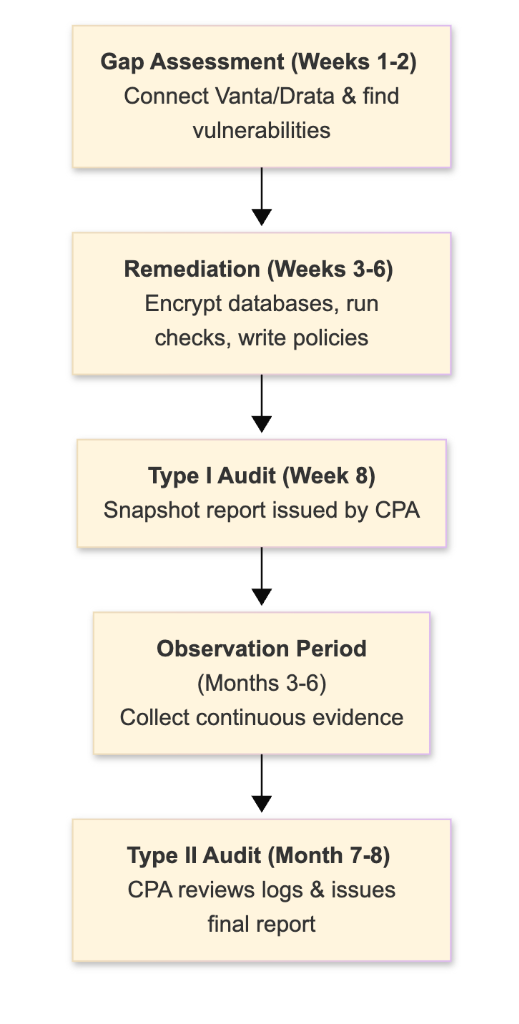
- Gap Assessment (Weeks 1–2): Connect your cloud provider to your compliance platform. It'll flag immediate configuration errors (e.g., public S3 buckets, missing MFA).
- Remediation (Weeks 3–6): Fix the configuration errors, write your formal security policies (usually generated from templates in your software), and get team members to install MDM agents.
- Type I Audit (Week 8): Your auditor reviews your active dashboard, logs, and policies. If everything looks good, they'll issue your Type I report.
- Observation Period (Months 3–6): Your continuous monitoring software tracks changes. As long as you don't commit major security infractions (like disabling MFA or pushing unreviewed code to main), evidence gathers automatically.
- Type II Audit (Month 7–8): The auditor samples evidence from the observation window and issues the final Type II report.
The Costs: Software vs. Auditor Fees
Compliance is a significant financial investment. Here's a breakdown of typical first-year expenses:
| Expense Category | Item | Cost (Annual) |
|---|---|---|
| Compliance Software | Vanta / Drata / Secureframe | $7,500 – $15,000 |
| CPA Auditor Fee | Independent audit firm (Type I + II) | $10,000 – $20,000 |
| Background Checks | Checkr employee verification | $50 – $100 per employee |
| Security Tooling | MDM licenses, password managers | $10 – $20/user/mo |
| Total First-Year Cost | Estimate for a small startup team | $18,000 – $36,000 |
How SOC 2 Compares to Other Standards
Depending on your target market, you might need to evaluate other compliance certifications. Here's how they stack up:
| Compliance Type | Primary Focus | Target Audience | Audit Mechanism |
|---|---|---|---|
| SOC 2 | Security operations & controls | B2B SaaS in North America | Independent CPA Audit |
| ISO 27001 | Security management framework | Enterprise buyers globally (Europe/Asia) | Accredited Registrar Audit |
| HIPAA | Patient health data (PHI) protection | US Healthcare sector | Self-assessment or third-party audit |
| GDPR | EU consumer privacy & data rights | Any business handling EU citizen data | Regulatory enforcement (No certification) |
If you are selling primarily to US startups and enterprises, start with SOC 2. If you are looking to expand heavily into Europe or global public sectors, ISO 27001 carries more weight.
Honest Caveats: When NOT to get SOC 2
Don't rush into compliance just because it sounds professional. It's a massive commitment that can derail an early-stage startup if timed poorly.
- You're Still Pivoting the Product: If you're rewritten your backend architecture twice in the last three months, wait. Continuous monitoring systems will constantly flag warnings on orphaned databases and fresh integrations, wasting developer cycles.
- You Haven't Had a Customer Ask for It: Buying compliance software "just in case" is a waste of capital. Keep your system secure—enforce MFA, encrypt database storage, use strong password rules—but save the audit fee until a contract is explicitly contingent on it.
- You Lack the Runway: A $30,000 compliance bill can shorten your runway by several weeks. Focus on building product-market fit first.
If you are ready to make your startup enterprise-ready, check out our tactical cluster guide on how to make your saas enterprise-ready for detailed SSO, RBAC, and audit logs execution strategies.
Building Operational & Security Discipline?
If you're scaling a B2B software business or modernizing your internal engineering and operational stack, explore Workstak Runtime for custom systems architecture or apply to join The Foundry to connect with fellow founders and operators.
Prioritize Workstak on Google
Enjoyed this analysis? Add us as a preferred source in your Google settings to get our weekly software teardowns and reviews directly in your feed.
Found this guide valuable?
Share it with other operators and builders.
Keep reading
All postsIdea Engineering: How to Find and Vet Products Worth Building
In an era where AI makes execution trivial, the real skill isn't building fast—it's choosing the right problem to solve.
Demystifying Agent Skills: The Rise of the SKILL.md
Stop bloating your system prompts. Learn how modular skill directories make LLM agents actually reliable.
Don't miss the next one
Get execution intelligence delivered.
Operational playbooks, systems architecture, and grounded analysis — zero filler.