How to Make Your SaaS Enterprise-Ready (Even With a 3-Person Team)
Going enterprise doesn't require a 50-person engineering team. Here is the pragmatic roadmap to implement SOC 2, SSO, RBAC, and audit logs without stalling your product development.


In this article
- What "Enterprise-Grade" Actually Means (And What It Doesn't)
- The Honest Pros and Cons of Pursuing Enterprise
- Enterprise Readiness — Short-Term vs. Long-Term ROI
- How Enterprise Investments Improve Your Consumer Product (The D2C Symbiosis)
- The Enterprise Readiness Roadmap (A Phased Approach)
- The Honest Caveats
- The Bottom Line
- FAQ: Diagnostic Enterprise Questions for Teams
You built a really great product, gained traction with consumers or SMBs, and feel like you are finally hitting your stride. Then, a prospect from a mid-market company or an enterprise division drops an email:
“We love the tool and want to deploy it to our team of 150. But before we can input any data, our IT compliance department needs to know: Are you SOC 2 compliant? Can we get SAML SSO? Do you have an audit log? Can you sign our DPA and BAA?”
The moment that email lands, you realize that the gap between a “working product” and an “enterprise-ready product” is not a feature gap. It is an infrastructure, process, and trust gap.
For a three-person startup or a small indie team, this request can feel like a brick wall. You look at the requirements and see weeks of diverted engineering time, tens of thousands of dollars in audit fees, and hours of legal works. You're faced with a choice: is this a massive revenue opportunity or is it a fatal distraction?
This guide should hopefully be a primer to navigating that choice. It will show you how to build enterprise-grade software without hijacking your roadmap, drowning in legal fees, or abandoning your consumer and SMB roots.
What "Enterprise-Grade" Actually Means (And What It Doesn't)
Most builders hear the word “enterprise” and picture Fortune 500 procurement cycles — a twelve-month saga involving bureaucratic committees, RFP spreadsheets, and endless security spreadsheets. The reality is far more nuanced.
The Spectrum of Enterprise Buyers
Enterprise readiness is not just a binary trigger. It's a spectrum that varies based on who is buying your tool:
- Mid-Market Companies (200–2,000 employees): These companies have formal IT departments and security officers. They care deeply about access control (SSO) and employee offboarding, but they are often flexible on certifications if you have solid security practices.
- Regulated Industries (Fintech, Healthcare, Edtech, Legal): Even a 10-person healthcare clinic or fintech project will demand enterprise-grade compliance (like HIPAA BAAs or GLBA compliance) because they are legally obligated to protect patient and financial data.
- The Fortune 500 & Government Sector: These buyers demand the full suite: SOC 2 Type II, custom Master Service Agreements (MSAs), liability indemnification, and custom deployment options.
The Four Dimensions of Enterprise-Grade SaaS
To tackle enterprise readiness, you have to really break it down into four distinct categories:
| Dimension | What It Covers | Examples |
|---|---|---|
| Security & Compliance | Documented proof of data protection and operational safety | SOC 2 Type II, ISO 27001, GDPR, HIPAA BAA, encryption at rest/in transit |
| Infrastructure & Reliability | Guarantees that the system is stable, scalable, and recoverable | 99.9%+ SLA, multi-region failover, load-tested APIs, active monitoring |
| Access & Identity | Control over who can enter the application and what they can do | SAML/OIDC SSO, SCIM user provisioning, Role-Based Access Control (RBAC), user audit logs |
| Commercial & Legal | Procurement-friendly packaging, contract standards, and dedicated support | MSAs, Data Processing Agreements (DPAs), custom invoicing, dedicated support tiers |
What Enterprise-Grade Is NOT
It is NOT enterprise pricing. You do not need to charge $50,000 a year to be enterprise-ready. You can sell an enterprise-grade seat for $49/month. Enterprise readiness is about trust infrastructure, not the number of zeros on the invoice.
If your software is stable, respects user access controls, protects customer data, and offers clear legal guidelines, it is enterprise-grade — regardless of your team's size or pricing strategy.
The Honest Pros and Cons of Pursuing Enterprise
Diverting engineering and product focus to pursue larger contracts is a high-risk trade-off. Let’s evaluate the advantages and disadvantages objectively.
The Case For (Pros)
- Higher Average Contract Value (ACV): While an SMB customer might pay $30–$100/month, an enterprise contract can easily range from $10,000 to $100,000+/year. Landing one enterprise customer can equal the revenue of fifty SMBs.
- Drastically Lower Churn: SMB and consumer churn is notoriously high (3–8% monthly is common). Enterprise customers sign annual or multi-year contracts, leading to predictable revenue with annual churn rates typically under 5–7%.
- Predictable Cash Flow: Upfront annual payments from enterprise customers provide non-dilutive capital to fund product development, marketing, and hiring.
- The Trust Flywheel: Passing a rigorous enterprise security review is a permanent badge of honor. It makes every subsequent sale easier and acts as a massive trust signal for SMB and consumer buyers.
- Deep Defensibility: Compliance barriers, custom integrations, and custom contracts make you extremely sticky. Once an IT department approves and integrates a tool, replacing it is an operational headache they prefer to avoid.
The Case Against (Cons)
- Long and Volatile Sales Cycles: Enterprise deals take 3 to 9 months to close. If your cash runway is under six months, relying on enterprise sales to survive is a recipe for bankruptcy.
- Significant Engineering Diversion: Building SSO, audit logs, RBAC, and prep work for compliance audits can occupy 2 to 4 months of engineering time. During this time, you will ship zero new user-facing features.
- Heavy Support Burden: Enterprise users expect guaranteed response times, dedicated account managers, and custom onboarding. A 3-person team can easily get overwhelmed by the support demands of a single large customer.
- The Roadmap Trap (Product Distortion): A single enterprise client paying 40% of your revenue can easily hijack your product roadmap. You run the risk of becoming a custom software consultancy for one large client rather than a scalable SaaS product.
- High Compliance Costs: Getting SOC 2 compliant is not cheap. Between compliance automation software, auditors, legal advice, and infrastructure updates, expect to spend $30,000 to $70,000 in your first year.
- Legal Redlines and Complexity: Enterprise legal teams will not sign your online Terms of Service. They will redline your Master Services Agreement (MSA), demand custom liability caps, and push for custom intellectual property clauses. You will need a lawyer.
The Diagnostic: Should You Pursue Enterprise Right Now?
Before writing a single line of SSO code or signing up for compliance software, answer these four qualifying questions:
- Do you have at least three inbound enterprise requests? (Do not build for hypothetical enterprise demand. Build when they are already knocking on your door.)
- Is your core product stable? (If your product is still pivoting or has major bugs, diverting your engineering team to compliance will kill your momentum.)
- Do you have 6+ months of runway? (If you are running out of cash, focus on fast self-serve SMB sales, not slow enterprise deals.)
- Do your existing customer pain points align with enterprise requirements? (If enterprise buyers want a completely different product, you are building a custom agency, not a SaaS product.)
If you answered “No” to two or more of these questions, you should probably stop. Focus on your core SMB or consumer market first. When the timing is right, you can transition to enterprise readiness.
Enterprise Readiness — Short-Term vs. Long-Term ROI
If you decide to take the leap, you must understand the financial reality. The costs are immediate and the returns are lagging.
The Consolidated Cost Breakdown
Here is a realistic breakdown of what it costs to prepare your SaaS for enterprise buyers in Year 1:
| Investment | Cost Range | Timeline | Purpose & Notes |
|---|---|---|---|
| SSO & Auth Integration | $0 – $500/mo | 2–4 weeks | Integrating WorkOS, Auth0, or Clerk to support SAML/OIDC. |
| Compliance Platform | $10,000 – $25,000/yr | Immediate setup | Platforms like Vanta, Drata, or Secureframe for continuous control monitoring. |
| SOC 2 Type I Audit | $15,000 – $30,000 | 2–3 months prep | One-time audit proving your security controls are designed correctly. |
| SOC 2 Type II Audit | $20,000 – $50,000/yr | Ongoing | Annual audit proving your controls operated effectively over a 3–12 month window. |
| Legal Agreements & MSA | $3,000 – $8,000 | 2–4 weeks | Drafting custom MSA, DPA, and SLA templates with a startup-focused attorney. |
| Dedicated Support Tools | $0 – $500/mo | Immediate | Tools for managing dedicated ticketing, uptime monitoring, and SLA tracking. |
| Total Year 1 Investment | $48,000 – $113,000 | 3–6 Months | Varies based on existing architecture and chosen auditor. |
The ROI Timeline
Understanding this investment requires dividing your return on investment into three clear phases:
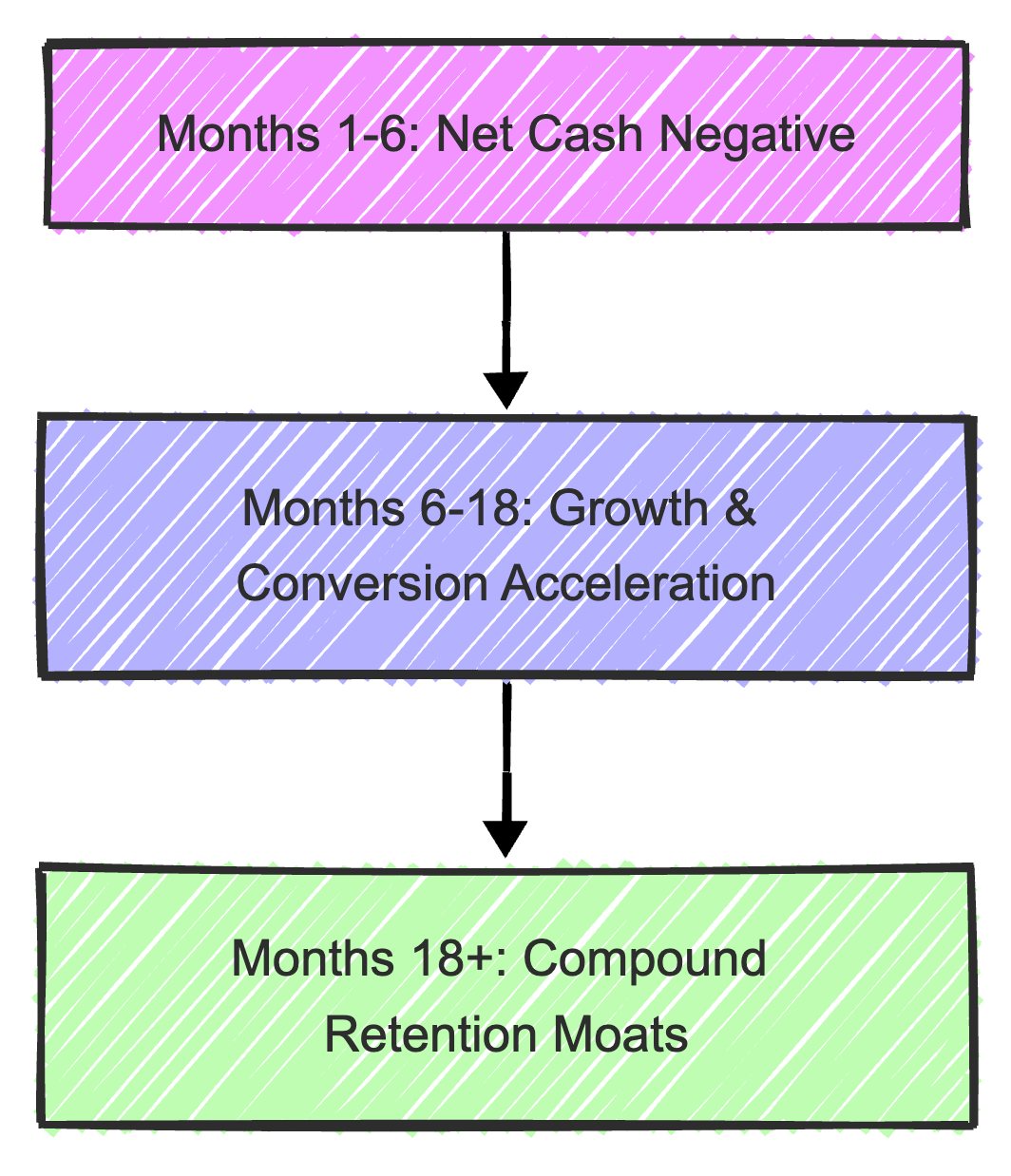
1. Short-Term (Months 1–6): Net Cash Negative
Your engineering velocity will drop as you implement SSO, audit logs, and security policies. You will pay upfront software and auditing fees. You should expect negative financial ROI in this phase. The return here is operational maturity: your system is more stable, your code is better documented, and your security settings are hardened.
2. Medium-Term (Months 6–18): Growth and Conversion Acceleration
Once you publish your Trust Center and get your SOC 2 badge, you will notice an immediate change. Sales conversations that used to stall for weeks now resolve in days. SMB customers who were hesitant to trust a small team with their data will sign up with confidence. You close your first 2–3 enterprise pilot deals.
The increased Average Contract Value (ACV) quickly offsets the initial auditing costs.
3. Long-Term (18+ Months): Compound Retention Moats
Enterprise contracts compound. If you sign $100k of enterprise revenue in Year 1 and maintain a 95% retention rate, that revenue is virtually guaranteed for Year 2. Enterprise accounts grow over time as they add seats and departments.
Additionally, if you ever decide to sell your SaaS, acquirers value enterprise-grade contracts and a SOC 2 audit trail at a significantly higher multiple than volatile consumer revenue.
How Enterprise Investments Improve Your Consumer Product (The D2C Symbiosis)
Startups often make the mistake of viewing enterprise readiness as a forks-in-the-road decision: either we are a D2C/SMB app, or we are an enterprise app.
This is a false dichotomy. The engineering and process investments required for enterprise readiness don't just sit in a drawer waiting for a Fortune 500 company. They actively improve the speed, security, and usability of your consumer and SMB products.
| Enterprise Investment | What It Gives Enterprise Buyers | What It Gives Consumer & SMB Users |
|---|---|---|
| SOC 2 Audit Prep | Assurance that their data is protected by audited controls. | Modern data encryption, active threat monitoring, and zero data leaks. |
| SAML/OIDC SSO | Centralized identity management for IT departments. | Fast, single-click login options and cleaner team account structures. |
| Granular RBAC | Strict compliance with the "least privilege" access rule. | Seamless sharing, delegation, and permissions for small team workspaces. |
| User Audit Logs | Compliance reporting showing who accessed what data. | Accountability trails for small business owners (e.g., "who deleted that invoice?"). |
| SLA & Uptime Discipline | Contractual guarantees of 99.9%+ availability. | A faster, highly reliable application with fewer outages and performance lag. |
| Load & Scalability Testing | Proof that the application won't fail under heavy corporate loads. | A snappy experience during traffic spikes and new product launches. |
When you frame enterprise preparation this way, it stops feeling like a distraction and starts feeling like a product quality investment.
Building a clean audit log system for enterprise buyers forced us to design better database tracking. Implementing SSO made our team invitation flow cleaner. The rigor of SOC 2 compliance forces small teams to adopt password managers, disable old access keys, and automate dependency updates.
This operational hygiene keeps you alive long enough to scale.
The Enterprise Readiness Roadmap (A Phased Approach)
Do not try to implement everything at once. If a 3-person team (or even more) tries to build SSO, write security policies, and schedule a SOC 2 audit in the same month, product development will grind to a halt.
Use this phased, sequential roadmap to distribute the workload over six months.
Phase 1: The Foundation (Weeks 1–4) — Zero or Low Cost
In this phase, you are building the basic security posture. These are best practices that cost zero dollars but save you massive headaches later.
- Implement SSL/TLS everywhere: Ensure all traffic is encrypted. Force redirect from HTTP to HTTPS.
- Encrypt databases at rest: If you are using AWS, Supabase, or Render, this is usually a single checkbox. Turn it on.
- Establish Environment Variable Hygiene: Ensure no secrets, API keys, or database passwords are hardcoded in your repository. Use a secrets manager or secure environment files.
- Enable Multi-Factor Authentication (MFA): Force MFA on every service your team uses — GitHub, Vercel, AWS, Stripe, Slack, and Google Workspace.
- Draft Basic Security Policies: Use open-source templates to write your first Information Security Policy, Incident Response Plan, and Access Control Policy. Keep them simple and realistic.
Phase 2: Authentication & Access Control (Weeks 5–10)
This is where you make the code changes required to support multi-user organizations.
- Implement Role-Based Access Control (RBAC): Move away from binary permissions. Create at least three default roles: Owner (full billing and system control), Member (can edit and create content), and Viewer (read-only access).
- Set Up SAML SSO: Do not write a custom SAML integration from scratch. It is a security risk and an engineering black hole. Use integration tools like WorkOS, Auth0, or Clerk to handle enterprise identity providers (Okta, Azure AD, Ping Identity).
- Start a Database Audit Log: Create an
audit_logstable in your database. Every time a user performs a destructive or critical action (changing billing, deleting data, exporting lists, inviting users), write a row containing:user_id,action,ip_address,timestamp, andstatus.
Phase 3: Compliance Certification (Months 3–6)
This phase is about proving your security posture to external auditors.
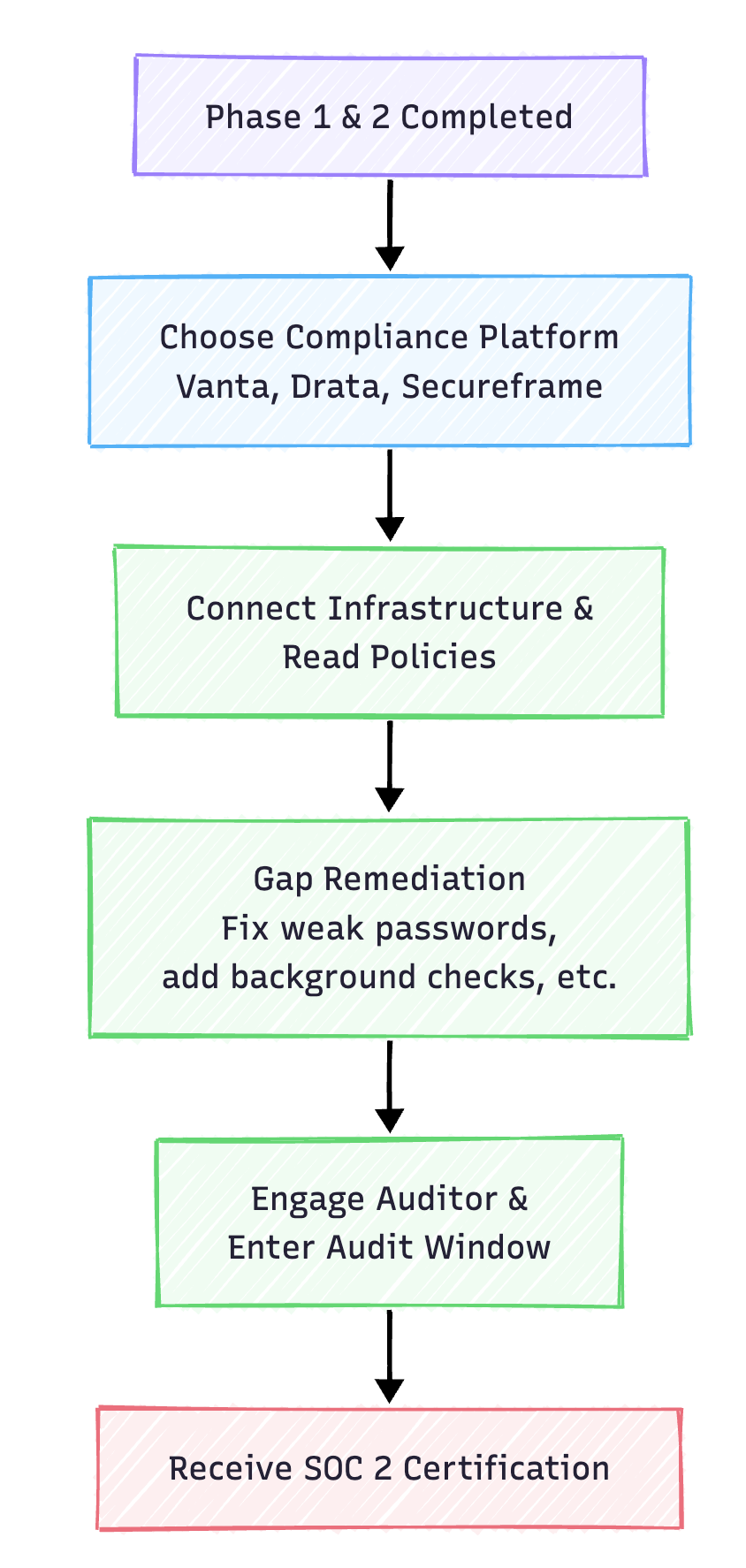
- Select a Compliance Automation Platform: Tools like Vanta, Drata, or Secureframe connect to your cloud providers, database, and GitHub account to continuously collect evidence of compliance. This eliminates 80% of the manual screenshot-taking during audits.
- Remediate Compliance Gaps: The platform will flag issues (e.g., "Developer X does not have MFA enabled on GitHub" or "Your database backups are not monitored"). Fix these flags.
- Schedule a SOC 2 Type I Audit: A Type I audit evaluates your security controls at a single point in time. It is faster and cheaper to obtain, making it the perfect initial milestone.
- Publish a Trust Center: Create a public-facing security page (e.g.,
workstak.co/security) where prospects can request access to your SOC 2 report under NDA.
Phase 4: Commercial & Legal Readiness (Months 4–8)
Your product is ready, now your business operations must match.
- Draft Legal Templates: Hire a startup attorney to draft three essential documents:
- Master Services Agreement (MSA): The base contract template for your enterprise deals.
- Data Processing Addendum (DPA): A document explaining how you handle, process, and secure customer personal data (mandatory for GDPR and HIPAA).
- Service Level Agreement (SLA): Your contractual commitment to uptime (e.g., 99.9%) and support response times (e.g., within 4 hours for critical issues).
- Define Your Enterprise Pricing Tier: Decide what features trigger the enterprise tier. A standard strategy is to place SAML SSO, custom SLA, and user audit logs exclusively behind the Enterprise tier. Read our playbook on The SaaS Founder's Guide to Sustainable GTM to structure these tiers without collapsing your margins.
- Set Up Dedicated Support Channels: Create a system for routing enterprise support tickets. You can use Slack Connect channels for your initial enterprise pilots to provide high-touch, direct support.
Phase 5: Go-to-Market for Enterprise (Months 6+)
With your product, compliance, and legal setup finalized, you can start selling.
- Add an "Enterprise" Page to Your Site: Outline your enterprise features, compliance certifications, and include a clear "Contact Sales" call-to-action.
- Leverage Self-Serve Traction: Look through your existing sign-ups. Identify users registered with corporate email domains (e.g.,
user@microsoft.comoruser@hubspot.com). Reach out to them. They already love your tool; offer to help them consolidate their usage under an enterprise team account with SSO and centralized billing. - Publish Security Documentation: Make your security protocols transparent. Ensure your documentation explains how you handle encryption, backups, and access control. This helps enterprise security officers approve your tool without needing a security review call.
The Honest Caveats
Before committing to this roadmap, keep these five realities in mind:
- Not every SaaS needs to go enterprise. Some of the most successful independent businesses run entirely on consumer, prosumer, and small team subscriptions. If your product doesn’t benefit from team collaboration or handle sensitive data, forcing it into the enterprise market can waste months of effort.
- SOC 2 is not a substitute for a good product. A SOC 2 compliance badge will get you past the IT department, but it won’t make users love your software. If you do not have Product-Market Fit (PMF) with end-users, compliance won't save your sales numbers.
- Beware the "Enterprise of One." If a massive prospect asks for a specific feature before signing, evaluate it carefully. If that feature doesn’t benefit your other clients, building it turns your scalable SaaS company into an expensive custom software consultancy. Be willing to walk away.
- Compliance automation tools are not magic. Software like Vanta and Drata helps gather evidence, but your team still has to do the actual work. You must run background checks, write policies, fix configuration vulnerabilities, and manage access requests. The tool tracks the work; you perform the work.
- Your first enterprise deal will take longer than you expect. Budget at least six to nine months from your first sales conversation to the day the money hits your bank account. Do not calculate your company's cash runway based on closing an enterprise deal quickly.
The Bottom Line
Enterprise-grade software is not defined by the size of your team, the complexity of your codebase, or the height of your pricing. It is defined by operational discipline.
The same engineering decisions that make a SaaS enterprise-ready — clean audit logs, secure authentication, reliable deployments, and transparent legal agreements — are the exact attributes that make software high-quality for everyone.
By taking a phased, structured approach, a 3-person team can easily meet the security and compliance needs of large companies without stalling their core product roadmap.
At Workstak, we engineer software and operational systems around these exact standards — clean data architecture, secure authentication, reliable workflows, and zero bloat.
If you are diagnosing tool fatigue and fragmented handoffs in your own organization, read our guide on You Don't Have a Tool Problem. You Have a Workflow Problem or explore Workstak Runtime to see how we architect custom operational infrastructure from first principles.
FAQ: Diagnostic Enterprise Questions for Teams
1. What is the difference between SOC 2 Type I and Type II?
A SOC 2 Type I audit reports on the design of a company's controls at a specific point in time (e.g., June 1st). A SOC 2 Type II audit reports on the operational effectiveness of those controls over a period of time (typically 3, 6, or 12 months). Type I is faster and cheaper to get, while Type II is what mature enterprise buyers ultimately require. For a deep dive into the certification timeline, automation, and costs, check out our playbook on Understanding SOC 2 Compliance.
2. Can we implement SSO without Auth0 or Okta?
Yes. You can use services like WorkOS, which act as a translation layer between your application and enterprise identity providers (SAML, OIDC) through a simple API interface. This is often the most cost-effective and fastest path for small teams.
3. Do we need a lawyer to negotiate every enterprise contract?
For your first few pilot deals, yes. You want an experienced SaaS attorney to review the initial redlines of your Master Services Agreement (MSA). Over time, as you establish standard positions on liability caps and intellectual property, your sales team can handle basic contract negotiations using pre-approved legal playbooks.
Prioritize Workstak on Google
Enjoyed this analysis? Add us as a preferred source in your Google settings to get our weekly software teardowns and reviews directly in your feed.
Found this guide valuable?
Share it with other operators and builders.
Keep reading
All postsIdea Engineering: How to Find and Vet Products Worth Building
In an era where AI makes execution trivial, the real skill isn't building fast—it's choosing the right problem to solve.
Demystifying Agent Skills: The Rise of the SKILL.md
Stop bloating your system prompts. Learn how modular skill directories make LLM agents actually reliable.
Don't miss the next one
Get execution intelligence delivered.
Operational playbooks, systems architecture, and grounded analysis — zero filler.