You Don't Have a Tool Problem. You Have a Workflow Problem.
Most operators buy more software hoping to fix broken processes. The fix is simpler: define the workflow first, then pick the tool.


In this article
Let's say you have 14 active SaaS subscriptions. You can probably name maybe nine of them off the top of your head. Three of those you haven't logged into since the free trial converted. One of them you're paying for because you're afraid the data you stored in it two years ago might be important someday.
This is not a tech problem. This is an operational clarity problem dressed up as a software budget.
Every week, the same pattern plays out in Slack channels, Reddit threads, and founder group chats: "What's the best CRM for a 5-person agency?" or "We need a project management tool — should we go with Notion, ClickUp, or Monday?" The answers flood in. Forty-seven recommendations. Twelve comparison articles. A lifetime deal that expires in 72 hours.
The operator signs up for three free trials, spends a weekend configuring dashboards, and six weeks later is back in the same thread asking the same question — because the tool wasn't the problem. The workflow was.
The Anatomy of Tool Fatigue
Tool fatigue is not about having too many subscriptions. It's actually about having subscriptions that don't map to defined processes.
The data on SaaS sprawl is pretty stark. Industry research consistently shows the average SMB now uses over 100 SaaS applications. But when you survey the actual employees, they report regularly using five to ten of those tools in their daily work. The gap between what's purchased and what's used is enormous — and it compounds every month when a new credit card charge hits.
Here is what tool fatigue actually looks like in practice:
| Symptom | What You Think the Problem Is | What the Problem Actually Is |
|---|---|---|
| You have 3 project management tools | "We haven't found the right one yet" | You haven't defined what "project management" means for your team's specific workflow |
| You keep switching CRMs | "None of them have the features we need" | You haven't mapped the exact data flow from lead capture to close |
| Your team uses spreadsheets despite having paid tools | "People just need more training" | The paid tool doesn't match the actual sequence of steps your team follows |
| You bought a tool on impulse because of a deal | "It was too good to pass up" | You had no framework to evaluate whether it solved a real bottleneck |
That last row deserves special attention. Impulse purchasing is the engine of shelfware. When a tool is discounted 80% or bundled into a lifetime deal, the psychological math shifts from "Does this solve a problem I have?" to "Can I afford not to grab this?" The answer to the second question is almost always yes — you can absolutely afford to skip a tool that doesn't fit a workflow you've defined. (For a deeper look at the economics of impulse SaaS purchasing, read The Double-Edged Sword of Lifetime Deals.)
Why Adding More Tools Makes It Worse
There is a well-documented psychological phenomenon called the paradox of choice. When presented with too many options, people don't make better decisions — they make no decision at all, or they make impulsive ones they later regret.
SaaS purchasing has become a textbook case of this paradox. There are now dozens of credible options in every software category. CRM alone has over 800 active products. Email marketing has over 400. Project management has over 300. Every single one of them has a polished landing page, a compelling demo video, and a G2 rating above 4.0.
When you sit down to "find the right tool," you enter a comparison loop that looks like this:
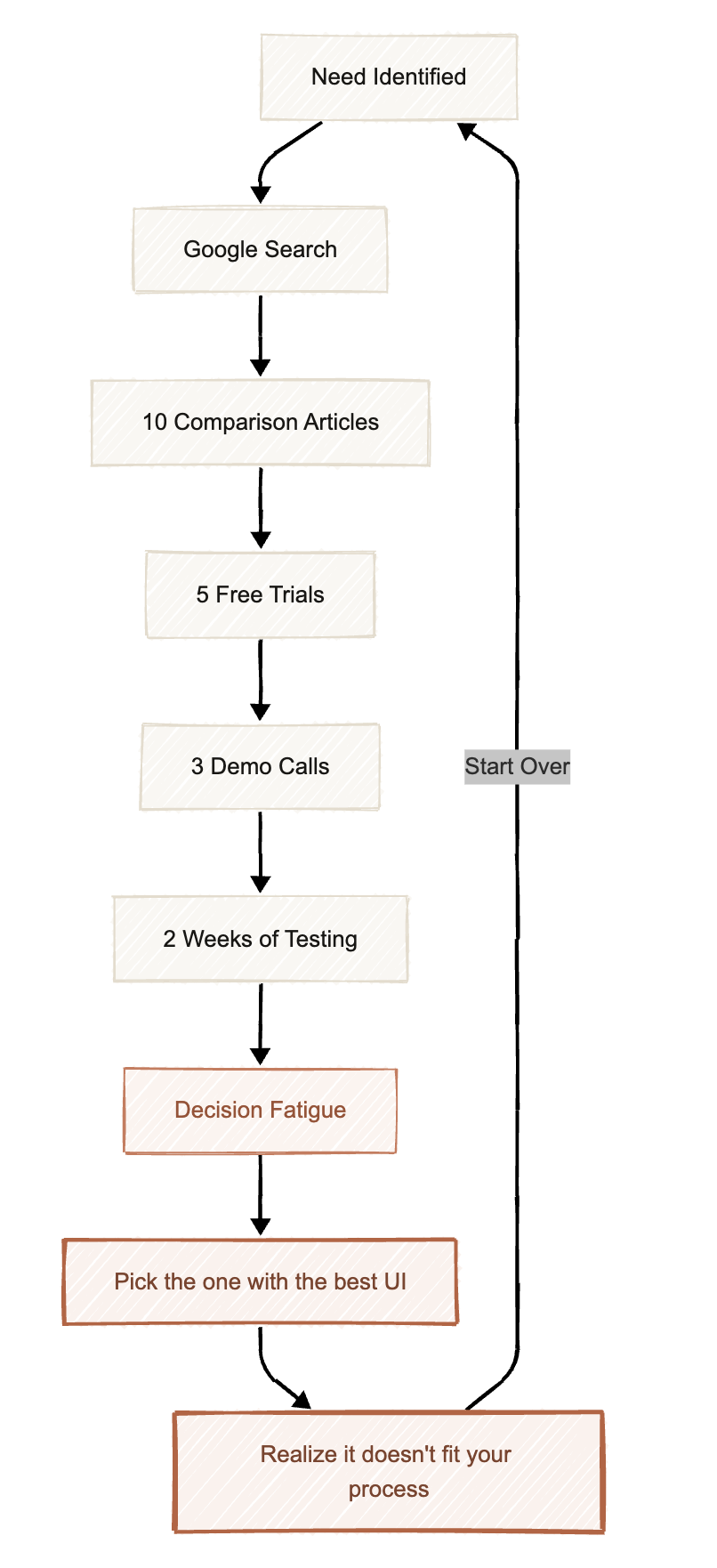
This loop is expensive. Not just in subscription dollars, but in the hours spent evaluating, configuring, migrating data, and training your team on tools that never stick. A conservative estimate puts the cost of a single failed SaaS adoption at 40-60 hours of productive time — time that could have been spent serving clients, closing deals, or building product. (We broke down the exact time cost of a single free trial — and how to short-circuit it — in The Hidden Cost of Free Trials.)
The antidote is not to evaluate tools harder. It is to stop evaluating tools first.
The Workflow-First Framework
The operators who consistently build efficient, low-cost stacks all follow the same pattern, whether they know it or not. They define the workflow before they shop for the tool. Here is the systematic framework.
Step 1: Map Your Current Workflow (As It Actually Is)
This is the step most people skip, and it's the most important one.
Do not write down how your process should work. Do not describe the ideal state you read about in a blog post. Document exactly what happens today, step by step, including the ugly parts.
For every core business process (lead generation, client onboarding, content publishing, support), write down:
- Who does each step
- What tool or method they currently use (including "manually in a spreadsheet" or "copy-paste from Slack")
- How long each step takes
- What triggers the next step
Here is an example for a 5-person agency's lead follow-up process:
| Step | Who | Current Method | Time | Trigger |
|---|---|---|---|---|
| 1. New inquiry arrives | — | Contact form → email inbox | — | Form submission |
| 2. Log the lead | Founder | Manually copy into Google Sheet | 5 min | Checking email |
| 3. Qualify the lead | Founder | Read their website, check LinkedIn | 15 min | "When I get to it" |
| 4. Send follow-up email | Founder | Write from scratch in Gmail | 10 min | After qualification |
| 5. Schedule a call | Founder | Back-and-forth emails for availability | 20 min | If they reply |
| 6. Track outcome | Nobody | — | — | — |
This map is messy. It is supposed to be. The mess is the diagnostic.
Step 2: Identify the Single Bottleneck
Look at your workflow map and find the one step that creates the most friction, wastes the most time, or fails the most often. Not the three biggest problems. Not a general feeling of inefficiency. One step.
In the example above, the bottleneck is obvious: Step 3 (Qualify the lead) takes 15 minutes per lead, is done manually, has no defined criteria, and runs on the trigger of "when I get to it" — which means leads sit unqualified for hours or days.
The discipline here is restraint. When you try to fix everything at once, you end up buying a do-everything platform that handles none of your steps well. When you fix one bottleneck, you can find the precise tool that solves that exact problem.
Step 3: Define the Outcome (In Measurable Terms)
Before you open a single product website, write down what "solved" looks like. Not in vague terms like "better lead management" or "more efficient workflows." In numbers.
For our agency example:
Bottleneck: Lead qualification takes 15 minutes per lead and has no consistent criteria.
Desired outcome: Leads are auto-enriched with company data (headcount, industry, tech stack) and scored against defined criteria within 2 minutes of form submission. Qualified leads automatically trigger a follow-up email sequence.
Success metric: Lead response time drops from 24+ hours to under 30 minutes. Founder spends zero manual time on qualification for leads that don't meet the minimum threshold.
Now you have a specification. You are no longer shopping for "a CRM." You are shopping for a tool that auto-enriches contact form submissions, scores them against custom criteria, and triggers an outbound sequence when they qualify. That's a very different — and much more productive — search.
Step 4: Select the Tool Last
Only now do you start looking at software. And because you have a clear specification, the evaluation process collapses from weeks to days.
Instead of comparing 15 CRMs on 47 features, you are asking three specific questions:
- Does this tool connect to my existing form provider (via API or webhook) to auto-ingest leads?
- Does it support custom scoring rules based on the enrichment data I need?
- Can it trigger an outbound email sequence automatically when a lead qualifies?
If a tool doesn't answer yes to all three, it's off the list. No demo call needed. No free trial required. The workflow specification acts as a filter that eliminates 80% of options before you spend a single minute evaluating them.
This is also why workflow connectivity matters so much when evaluating any software. A tool that can't plug into the rest of your stack via APIs or webhooks is a tool that will create a new silo — and a new bottleneck — instead of solving the one you identified.
The Full Picture: Before and After
Here is what the agency owner's lead follow-up process looks like after applying the Workflow-First Framework:
| Step | Before | After |
|---|---|---|
| 1. Lead arrives | Contact form → email inbox | Contact form → webhook to enrichment tool |
| 2. Lead enriched | Manual (15 min/lead) | Auto-enriched with company data (2 min) |
| 3. Lead qualified | Founder eyeballs it | Scored automatically against defined criteria |
| 4. Follow-up sent | Written from scratch (10 min) | Templated sequence triggered for qualified leads |
| 5. Call scheduled | Email back-and-forth (20 min) | Calendar link embedded in automated follow-up |
| 6. Outcome tracked | Not tracked | Auto-logged with stage, source, and response time |
Total founder time per lead: dropped from ~50 minutes to ~5 minutes (for the leads that actually qualify and need a personal touch). Unqualified leads are handled entirely by the workflow and never consume human attention.
The tool selection in this example doesn't matter. It could be Clay for enrichment and Instantly for sequencing. It could be Apollo for both. It could be a Make.com automation stitching three free-tier tools together. The point is that the workflow determined the tool, not the other way around.
The Honest Caveats
This framework is not a universal solution. There are genuine situations where the tool really is the problem:
When you've outgrown a tool's technical limits. If your email tool caps at 500 contacts and you have 5,000, that's a tool problem. No workflow redesign fixes a hard ceiling.
When the tool is unreliable. If your automation platform goes down twice a week, breaking your workflows, the issue is infrastructure — not process design.
When you're in a genuinely new category. If you're exploring a capability that didn't exist six months ago (like AI-powered video generation for sales outreach), there may not be a defined workflow to map yet. In that case, experimentation with tools is the right approach — but set a time-boxed budget and a clear kill criteria before you start.
When the cost structure changes. A tool you bought at a lifetime deal rate two years ago might now be charging usage-based fees on AI tokens that make it unsustainable. The workflow is fine; the economics changed underneath you. (This is the exact dynamic we break down in Deciphering AI & SaaS Pricing.)
For everything else — the vague dissatisfaction, the subscription creep, the feeling that you're always one tool away from having your operations figured out — the workflow is where you start.
The Bottom Line
Tool fatigue is a symptom. The disease is operational ambiguity — not knowing what your process is, where it breaks, and what "fixed" looks like in concrete terms.
The next time you feel the urge to sign up for another free trial, pause. Open a blank document. Map the workflow. Find the bottleneck. Define the outcome. Then — and only then — go shopping.
You will buy fewer tools. The ones you buy will stick. And you will stop paying for software that collects dust.
Ready to eliminate fragmented tools and operational drag? Explore Workstak Runtime for custom operational systems engineered from first principles, or join The Foundry to build alongside high-leverage operators.
Prioritize Workstak on Google
Enjoyed this analysis? Add us as a preferred source in your Google settings to get our weekly software teardowns and reviews directly in your feed.
Found this guide valuable?
Share it with other operators and builders.
Keep reading
All postsIdea Engineering: How to Find and Vet Products Worth Building
In an era where AI makes execution trivial, the real skill isn't building fast—it's choosing the right problem to solve.
Demystifying Agent Skills: The Rise of the SKILL.md
Stop bloating your system prompts. Learn how modular skill directories make LLM agents actually reliable.
Don't miss the next one
Get execution intelligence delivered.
Operational playbooks, systems architecture, and grounded analysis — zero filler.