The Buyer's Guide to Sales & Outreach Tools
How to vet outbound tools for deliverability, data hygiene, and actual ROI without burning your domain or budget.


In this article
- The Three Layers of a Modern Sales & Outreach Stack
- The Core Traps of Outbound Software Marketing
- The Outbound Vetting Checklist
- The Consolidated Stack Budget (What Outbound Actually Costs)
- The Stack Decision Matrix: Matching Budget to Stage
- The Honest Caveats
- The Bottom Line
- FAQ: Outbound Infrastructure & Deliverability
So you buy a subscription to an "AI sales tool" that promises to send 10,000 hyper-personalized messages a day, scrape leads on autopilot, and fill your calendar with booked meetings. You load a list, click launch, and just wait.
Two weeks later, the results are in: your open rate has collapsed to 4%, your secondary domains are blacklisted, your primary company domain has a damaged reputation, and your inbox is completely empty.
This is the standard failure loop of modern cold email.
The problem wasn't your sales copy or your offer. The problem was that you bought into marketing hype without understanding the underlying math of deliverability, DNS configuration, and data accuracy.
Outbound sales tools are often sold as all-in-one solutions that automate away the work. In reality, outbound is a highly technical discipline that requires a modular, well-configured stack.
This guide will show you how to look past the feature matrices, avoid the hidden traps of outbound marketing, and choose tools that actually land in the primary inbox with verified data.
The Three Layers of a Modern Sales & Outreach Stack
Outbound sales is not just a single tool. It's an entire workflow. When you attempt to buy a single "magic bullet" software that promises to handle prospecting, verification, warming, sending, and follow-ups all in one dashboard, you usually get a tool that does all of them poorly.
A scalable, reliable outbound system is composed of three distinct layers:
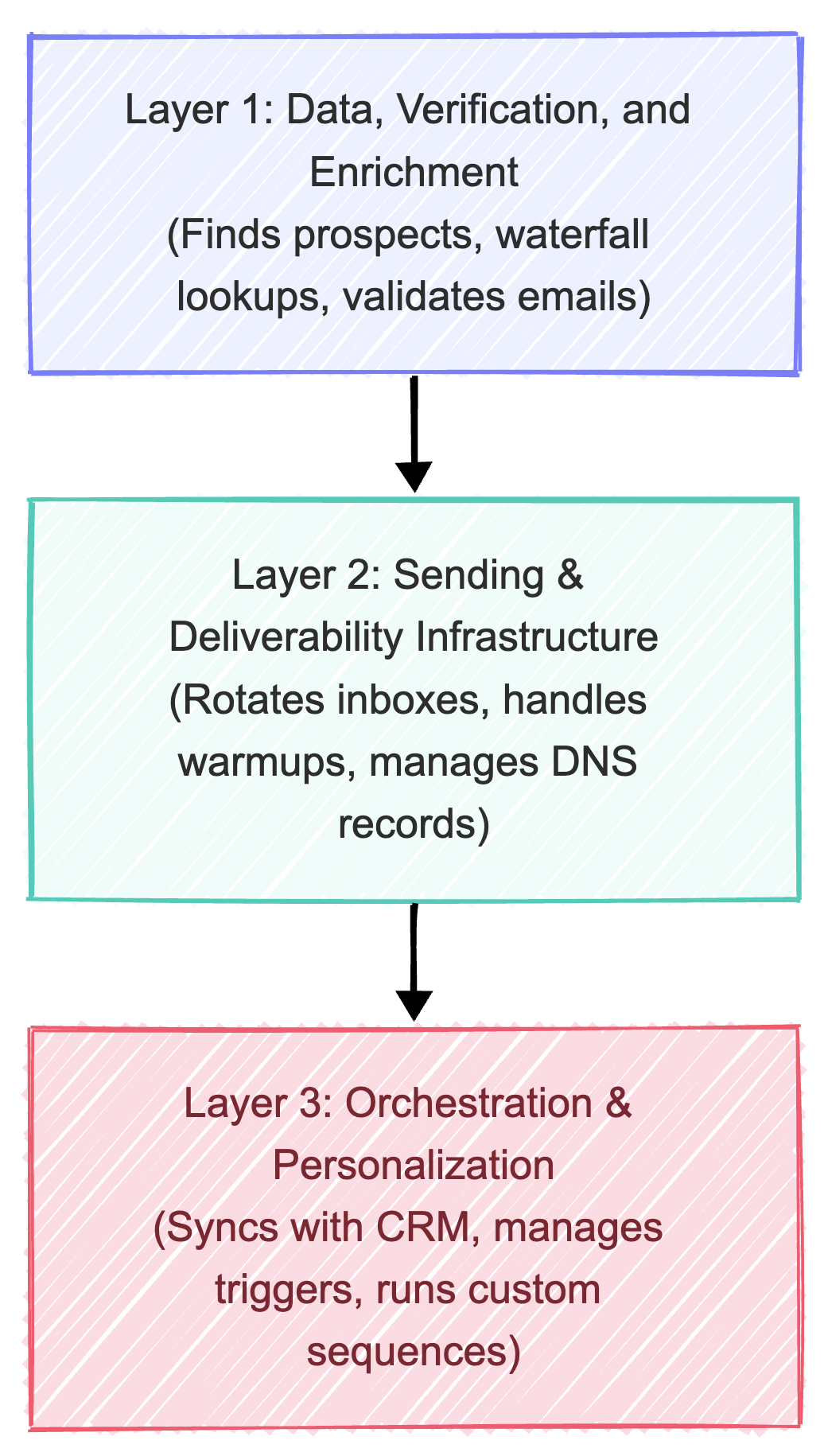
Layer 1: Data, Verification, and Enrichment
This layer is responsible for identifying your target accounts and finding the correct, verified contact details of decision-makers.
- What it does: Scrapes public directories, enriches company profiles, resolves social media URLs, and verifies email status.
- Key technology: Waterfall Enrichment. Chaining multiple database APIs together to check for a lead's contact details. If database A doesn't have the verified email, the query automatically checks database B, then C, until a record is found.
- Vetting metrics: Target contact accuracy, bounce detection rates, data freshness (how recently the job titles were updated), and cost per verified contact.
Layer 2: Sending & Deliverability Infrastructure
This layer is the engine that actually delivers your messages to the prospect's primary inbox.
- What it does: Hosts your secondary sending domains, rotates across dozens of individual email accounts (inboxes) to distribute volume, and monitors email reputation.
- Key technology: Multi-Inbox Rotation. Distributing a sending volume of 500 emails per day across 10-15 different email accounts to ensure no single account sends more than 30-40 emails per day.
- Vetting metrics: Ease of domain configuration, IP address reputation, automated SPF/DKIM validation, and warm-up queue management.
Layer 3: Orchestration & Personalization
This layer connects your data to your sending infrastructure, controls the sequencing of messages, and integrates with your core sales CRM.
- What it does: Manages wait times between steps, handles automated follow-up logic, registers replies to stop sequences, and pushes leads to your CRM when they show interest.
- Key technology: Webhooks and conditional branch logic.
- Vetting metrics: Native integration with your CRM, API response times, webhook reliability, and conditional pathing based on user behavior (e.g., if they click a link, wait 2 days and send message X).
The Core Traps of Outbound Software Marketing
The sales tech market is highly competitive, leading to aggressive marketing claims. Before subscribing to any tool, learn to recognize these four common traps:
1. The "Unlimited Lead Credit" Trap
Many tools advertise "unlimited leads" or "50,000 monthly exports for $49." If an offer sounds too good to be true, it is. Databases are expensive to maintain and enrich in real-time. "Unlimited" lists are almost always stagnant databases with scraped data that has not been refreshed in 12–24 months.
Using these lists without third-party verification will drive your bounce rates above 10%, flagging your sending domains as spam senders.
2. The "AI Icebreaker" Trap
A popular feature is "AI-generated personalization." The tool reads a prospect's LinkedIn profile and writes a custom opening line.
In practice, this generates generic, robotic sentences like: "I saw you have been CPO at Company X for 3 years, congrats! I am also interested in growth." Modern buyers see right through these templates. If your personalization looks automated, it is worse than sending no personalization at all.
3. The "Single-Domain Sender" Trap
Avoid any sending tool that encourages you to send cold emails from your primary company domain (e.g., sending outreach from sales@yourcompany.com). If you send high-volume cold outreach from your primary domain, it will eventually get flagged.
When your primary domain gets blacklisted, your company's everyday emails—to clients, partners, and employees—will start landing in spam.
4. The Hidden Credit-Gouging Trap
Many all-in-one tools lure you in with a low base price, only for you to realize that search credits, email exports, mobile phone lookups, and email verifications all consume different credit types that require expensive add-ons.
Always calculate your total expected monthly usage volume before judging the pricing.
The Outbound Vetting Checklist
To avoid buying shelfware, use this 4-step checklist to vet any sales tool before committing your budget.
Step 1: The 100-Sample Test (Verify Data Accuracy)
Do not trust a database's claims of "95% accuracy." Test it yourself before you buy:
- Identify a highly specific target audience (e.g., "CPOs at fintech companies with 50-200 employees in New York").
- Search the tool's database and export a sample of 100 leads.
- Manually audit the first 50 leads on LinkedIn. Check: Is the person still at that company? Is their job title correct?
- Run all 100 emails through an independent verifier (like ZeroBounce or NeverBounce).
- The threshold: If more than 15% of the job titles are outdated, or if the bounce rate of "safe" emails exceeds 5%, do not buy the database.
Step 2: The Deliverability & DNS Audit
High deliverability requires strict configuration of secondary domains. The tool you choose must support and enforce these four DNS standards:
| Record Type | What It Does | Why It Matters for Deliverability |
|---|---|---|
| SPF (Sender Policy Framework) | Lists the specific IP addresses and servers allowed to send mail from your domain. | Prevents spam filters from rejecting your emails as spoofed messages. |
| DKIM (DomainKeys Identified Mail) | Adds a cryptographic signature to every outgoing email header. | Proves the email was not modified in transit and validates the domain owner. |
| DMARC (Domain-based Message Authentication) | Instructs mail servers on how to handle messages that fail SPF or DKIM checks. | Mandatory for passing Google and Yahoo's strict spam filters (which block domains without DMARC). |
| MX Records & Redirects | Directs incoming mail and redirects root domains to your main website. | If a spam filter checks your sending domain (yourcompany-outreach.com) and it doesn't redirect to a live site, it is instantly flagged as suspicious. |
Step 3: The Dual-Verification Check
Ensure your sending software has a native "verification check" before emails are sent, or integrate an external verification step into your workflow.
Never import a CSV directly from a database and send to it immediately. Double-verify every single email. If an address returns as "catch-all" or "unverifiable," segment it out and only send to it in small, isolated batches.
Step 4: The API & Integration Test
If you cannot automate your sales data flow, you will waste hours exporting CSV files, cleaning them in Excel, and uploading them manually.
Test the tool's integration capabilities:
- Does it support native webhook triggers (e.g., "When a prospect replies, send a webhook")?
- Does it have a clean, documented REST API?
- Does it integrate with orchestration tools like Make.com or Zapier without requiring custom code?
The Consolidated Stack Budget (What Outbound Actually Costs)
One of the biggest surprises for founders is that the software subscription is only a fraction of the cost of running outbound. The true cost lies in the infrastructure required to send safely.
Here is a realistic budget breakdown of what a proper outbound stack costs:
| Component | Purpose | Cost Range (Scrappy Stack) | Cost Range (Scale Stack) |
|---|---|---|---|
| Secondary Domains | Buy alternate domains (e.g., getworkstak.co instead of workstak.co) to isolate sending risk. | $30/mo (3 domains x $10/yr) | $150/mo (15 domains) |
| Email Seats | Purchase Google Workspace or Microsoft 365 seats for your sending inboxes. | $36/mo (6 inboxes x $6/seat) | $180/mo (30 inboxes) |
| Sending Platform | Multi-inbox rotation, warmups, and sequence tracking. | $47/mo | $97/mo |
| Enrichment & Leads | Lead search database and waterfall lookup engines. | $49/mo | $149/mo – $249/mo |
| Independent Verification | Double-verify list uploads to prevent bounces. | $15/mo | $50/mo |
| Total Monthly Outbound Cost | The real operational cost of running email outreach. | $177/mo | $626/mo – $726/mo |
If you are trying to run outbound sales for under $50/month, you are likely using your primary domain and a single inbox. This is a high-risk approach that will damage your domain reputation.
The Stack Decision Matrix: Matching Budget to Stage
Choose your sales stack based on your team's budget, size, and pipeline requirements.
The Solo Founder / Scrappy Stack (<$200/mo)
Best for early-stage startups, bootstrapped founders, and solopreneurs looking to find their first 10-20 customers.
- Data Layer: Apollo (Free or Basic tier for prospecting) + manual validation.
- Sending Layer: Instantly (Growth tier) for basic sequence management and inbox rotation.
- Infrastructure: 3 secondary domains, 6 individual inboxes (2 per domain).
- Workflow: Find targeted leads in Apollo, export to CSV, run through a verification tool, upload to Instantly, and run a simple 3-step sequence.
The Agency / High-Velocity Stack ($300–$600/mo)
Best for growing agencies, B2B SaaS teams with product-market fit, and dedicated sales reps sending 500+ emails daily.
- Data Layer: Clay (for waterfall enrichment across multiple databases) + Apollo (for initial search filtering).
- Sending Layer: Smartlead or Instantly (hyper-rotation package).
- Infrastructure: 10 secondary domains, 20-30 individual inboxes.
- Workflow: Use Clay to build enriched lead lists, pull data from multiple databases simultaneously, verify in real-time, push automatically to Smartlead via API, and track conversions in a lightweight CRM.
The Enterprise / Account-Based Stack ($1,000+/mo)
Best for established companies targeting high-value enterprise accounts with custom, multi-channel outreach.
- Data Layer: ZoomInfo or custom scrapers + manual validation by a virtual assistant.
- Sending Layer: Custom API routing or enterprise-grade email senders.
- Infrastructure: Dedicated IP addresses, custom DNS configurations, and active reputation monitoring.
- Workflow: Identify target accounts manually, research recent news, write custom personalized guides, send from a dedicated inbox with priority delivery, and coordinate with phone and LinkedIn outreach.
Need help connecting your CRM, enrichment, and outreach layers into a single source of truth? Explore Workstak Runtime.
The Honest Caveats
Outbound sales technology is a powerful tool, but it is not a magic solution. Keep these realities in mind:
- Outbound will not save a weak offer. If your product doesn't solve a clear, painful problem, or if you don't have product-market fit, sending 10,000 emails will just alienate your market faster. Spend time defining your positioning before investing in outbound infrastructure.
- Infrastructure requires active management. Inboxes occasionally fall off, domains get flagged, and copy fatigued. You cannot "set and forget" an outbound system. Expect to spend 2-3 hours a week managing deliverability, testing copy, and reviewing reply categories.
- Deliverability is a moving target. Google and Yahoo regularly update their spam filtering algorithms (such as the February 2024 update that capped acceptable spam rates at 0.3%). What works today may stop working tomorrow. You must remain adaptable and prioritize domain safety.
- Quantity is not quality. In the era of AI code generation and automated outreach, buyers are overwhelmed by cold messages. A highly targeted list of 50 accounts with custom, relevant copy will consistently outperform a generic blast to 5,000 names.
The Bottom Line
A successful sales and outreach engine is built on technical rigor and operational discipline.
Do not choose tools based on marketing promises of "automated AI sales." Instead, choose tools that support multi-inbox rotation, offer clean API integrations, and provide transparent data verification options. Sequence your investments by starting with a scrappy, well-configured stack before scaling up your infrastructure.
If you are currently building out your company's go-to-market strategy, alignment between pricing, product positioning, and outreach channels is critical. Review our playbook on The SaaS Founder's Guide to Sustainable GTM to structure your pricing tiers before launching outbound campaigns.
If you are trying to build trust and authority with your target buyers organically, read our guide on How to Sell on Reddit Without Getting Destroyed to learn how to contribute value to community forums before initiating direct cold outreach.
FAQ: Outbound Infrastructure & Deliverability
What is a secondary sending domain?
A secondary sending domain is an alternate domain name that looks similar to your primary domain (e.g., if your primary site is workstak.co, your secondary domains might be getworkstak.com or workstak-app.co). You buy these domains specifically to host the email accounts used for cold outreach, protecting your main business domain from spam flags.
How long does it take to warm up a new email inbox?
You should warm up a new email account for at least 14 to 21 days before sending any outbound campaigns. During the warmup period, automated tools send slow volumes of emails back and forth between network accounts, marking them as important and removing them from spam folders to build domain reputation.
What is the maximum number of emails I should send per inbox per day?
To maintain high deliverability, cap sending at 30 to 40 emails per inbox per day (including warmup messages). If you need to send 400 emails per day, rotate the volume across 10-12 different inboxes rather than sending all of them from a single account.
Prioritize Workstak on Google
Enjoyed this analysis? Add us as a preferred source in your Google settings to get our weekly software teardowns and reviews directly in your feed.
Found this guide valuable?
Share it with other operators and builders.
Keep reading
All postsIdea Engineering: How to Find and Vet Products Worth Building
In an era where AI makes execution trivial, the real skill isn't building fast—it's choosing the right problem to solve.
Demystifying Agent Skills: The Rise of the SKILL.md
Stop bloating your system prompts. Learn how modular skill directories make LLM agents actually reliable.
Don't miss the next one
Get execution intelligence delivered.
Operational playbooks, systems architecture, and grounded analysis — zero filler.